Give your agent a browser,
not your browser.
Browser Guard MCP gives a coding agent an isolated Chromium session with public-only navigation, explicit capability profiles, one-use approval for secrets, and evidence that never leaves process memory.
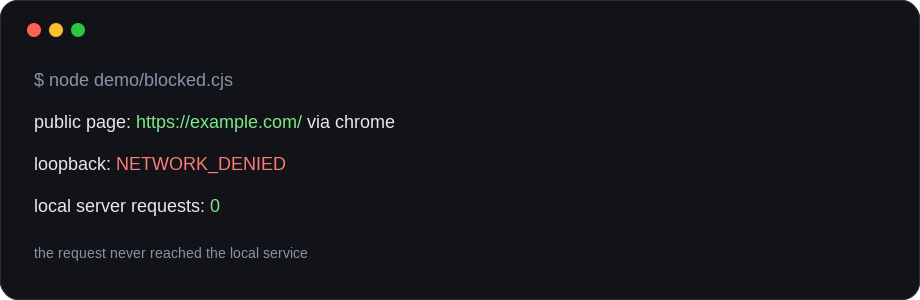
Public HTTP(S) only
Literal private, loopback, link-local, and special-use addresses are rejected before the browser starts. A loopback egress proxy checks DNS for redirects and subresources.
Narrow tool surface
Nine router tools. No browser_evaluate, cookies, storage, tabs, network inspection, or screenshots.
One-use approval
Card, password, and one-time-code entry requires a native macOS confirmation bound to the origin, tool, and exact arguments.
Evidence in memory
Bounded snapshots and console output expire with the grant. The local ledger stores no URLs, page text, arguments, or confirmation IDs.
Quick start
git clone https://github.com/alexandryasukaitisss-cmd/browser-guard-mcp.git
cd browser-guard-mcp
npm test
npm install -g @playwright/mcp
cp examples/config.example.json ~/.config/browser-guard-mcp/config.json
node src/cli.cjs --check --config ~/.config/browser-guard-mcp/config.json
Then add the server to your MCP client. The full setup, tool list, and security boundary are in the README.
What it does not claim
Not an OS sandbox
Chromium runs with the user's privileges. A browser-engine exploit is outside this design.
Not DLP
Sensitive-field detection is heuristic. Read the threat model before giving an agent real data.